Available address verification modes
Address Verification for Dataverse (Power Apps and Dynamics 365) offers several ways to verify addresses:
- Address autocomplete: inline verification with a control that is integrated in the form. Users search for an address and the selected result fills the address columns.
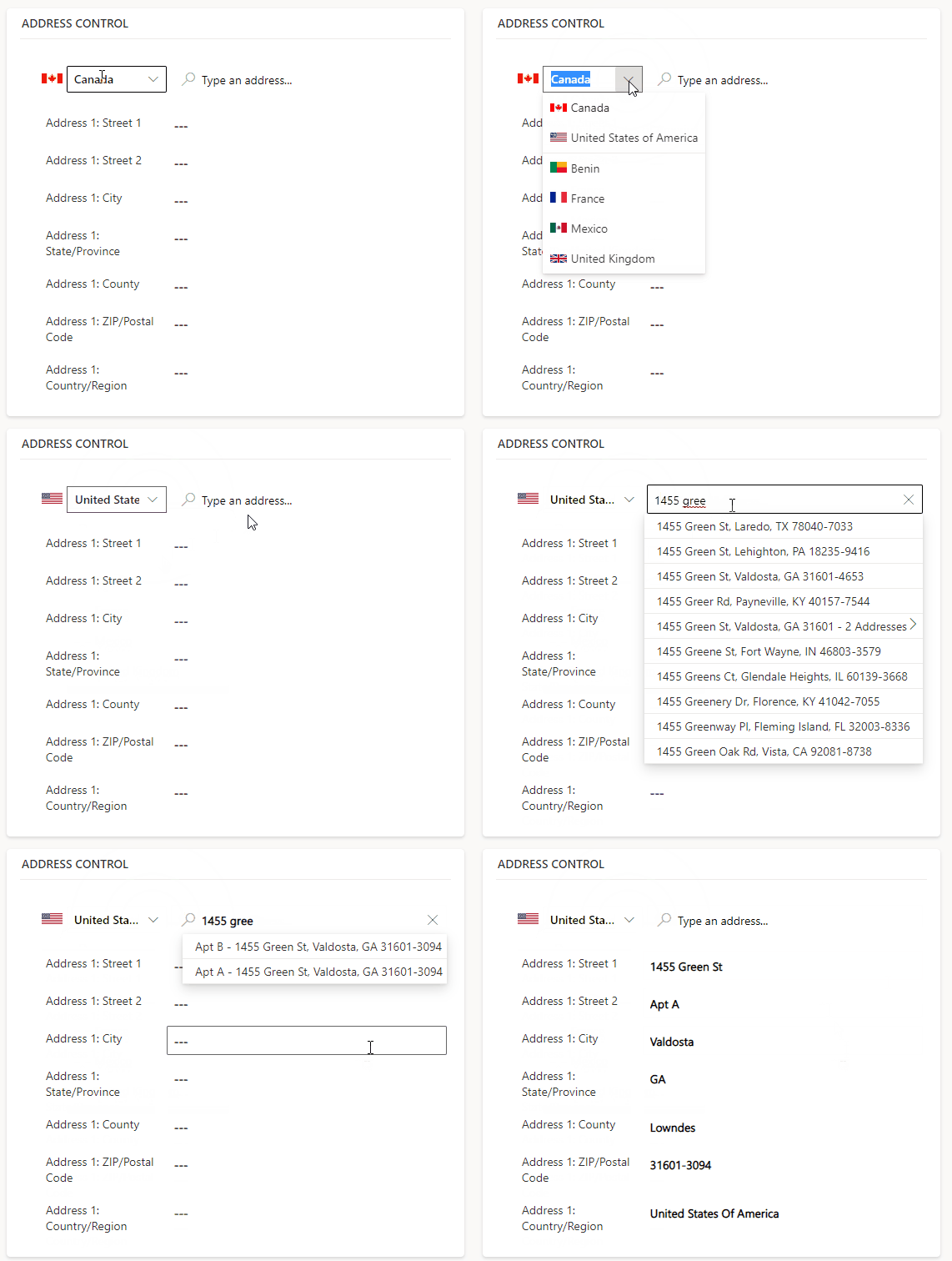
The example above uses Melissa Express Entry. The user experience (country selection and search bar) and the completeness and quality of the data depend on the API used.
- Validate button: a button on Account and Contact forms that validates and enriches the current record (Melissa Personator and Melissa Global).
- Background validation (workflow): validate addresses without user interaction using a classic workflow with the Sharp XRM workflow steps. You control how the verified address is used.
- Power Automate: validate addresses from a Power Automate flow with the Address Validation actions and the standard Microsoft Dataverse connector, for example Azure Maps, Google Maps Geocoding or PostGrid.
- Bulk Address Validation (Preview): validate the addresses of many records in one run, from a saved view or FetchXML. Currently available for Melissa, Google Maps and Azure Maps.
Features by address verification API
The table below helps you choose an API based on the user and administrator experience your organization needs.
| API | Autocomplete | Validate button | Background (workflow) | Power Automate action |
|---|---|---|---|---|
| Google Maps * | Yes | No | Yes | Yes (Geocoding and Address Validation) |
| Azure Maps | Yes | No | Yes | Yes |
| Melissa Global | No | Yes | Yes | Yes |
| Melissa Personator | No | Yes | Yes | Yes |
| Melissa Express Entry | Yes | No | No | No |
| Canada Post | Yes | No | Yes | No |
| PostGrid (add-on) | Yes | No | Yes | Yes (US/Canada and International) |
* Google Maps requires these Google APIs in your Google Cloud project: Maps JavaScript API and Places API (autocomplete), Geocoding API (background validation and the Geocoding action), and Address Validation API (only for the Google Address Validation action).
Bing Maps is deprecated and is not included in this table.
Data quality enhancements by API
Beyond the verification modes above, the following data quality capabilities depend on the API you choose. For details, see Understanding Address Confidence Levels and Postal Code Accuracy and Unit Number Preservation.
| Capability | Google Maps | Azure Maps | Melissa (Global / Personator / Express Entry) | Canada Post | PostGrid |
|---|---|---|---|---|---|
| Confidence level | Standardized (Very High / High / Medium / Low) | Standardized (Very High / High / Medium / Low) | Melissa result codes, with a configurable blocking list (details) | - | Verification status (Verified, Corrected, MissingSecondary...) with a confidence level |
| Extended postal code (ZIP+4): base value in Postal Code, full value in Extended Postal Code | Yes | Yes | With the advanced setting Include Extended Postal Code | - | Yes (US/Canada action) |
| Unit / suite number: keeps the user-entered unit when the provider does not return one | Returns the sub-premise when available | Preserved | Returns the sub-building when available | Returns the unit when available | Returns the unit when available, and reports a missing unit |
Confidence levels and extended postal codes are available in single-record validation and in Bulk Address Validation (Preview), and can be written to record columns through your Field Mapping configuration.