Overview
Address Validation for Dataverse exposes Azure Maps address search as a Dataverse unbound action named sharpxrm_VerifyWithAzureMaps (display name Verify With Azure Maps). Power Automate can call it with the standard Microsoft Dataverse connector and its Perform an unbound action step.
The action returns the best matching address, a confidence level and the coordinates. It does not update any record. Your flow decides whether the match is good enough to write back.
Before you start
- Address Validation for Dataverse is installed in a version that includes the Power Automate unbound actions (
sharpxrm_VerifyWithAzureMapsappears in the Action Name list). - A valid Address Validation license.
- An active API Configuration row with Validation Service Type = Azure Maps API and your Azure Maps key. See Setup you Azure Maps API Credentials.
- A Microsoft Dataverse connection in Power Automate.
How the example flow works
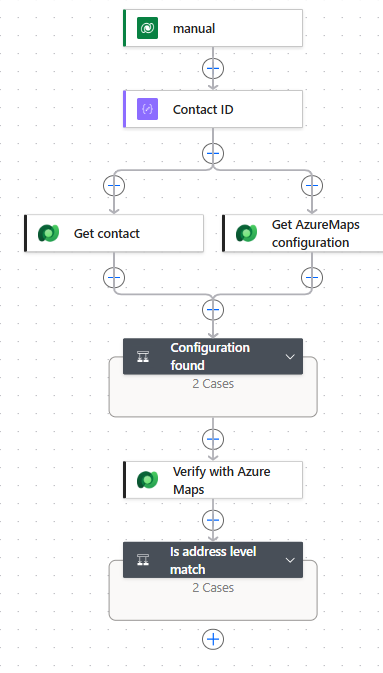
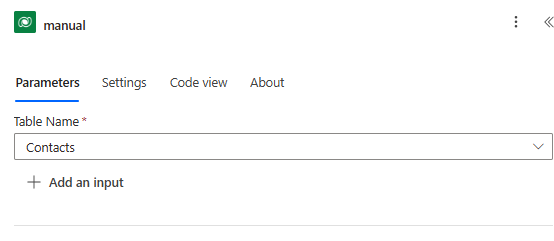
- When a row is selected (Table Name = Contacts): users run the flow from the Flow menu on a contact. With several contacts selected, the flow runs once per contact.
- Contact ID (Compose) and Get contact (Get a row by ID): read the current Address 1 columns, including latitude and longitude.
- Get AzureMaps configuration (List rows) and Configuration found (Condition with a Terminate in the False branch).
- Verify with Azure Maps (Perform an unbound action).
- Is address level match (Condition): overwrites Address 1 only for a confident, address-level match.
Find the API Configuration
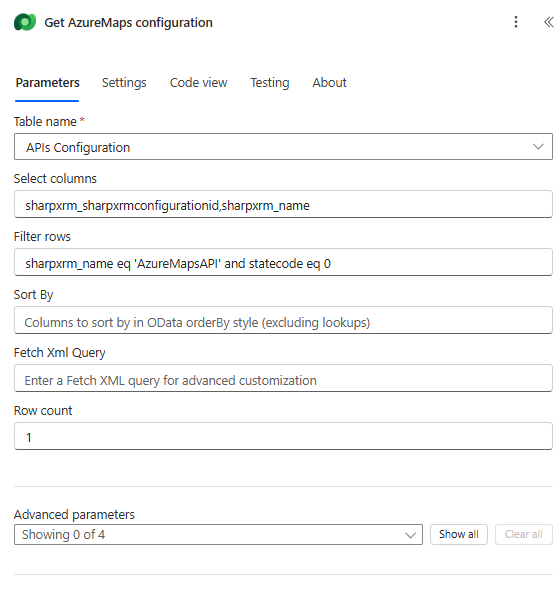
Use List rows on APIs Configuration to get the configuration ID by name instead of hard-coding a GUID:
| Field | Value |
|---|---|
| Table name | APIs Configuration |
| Select columns | sharpxrm_sharpxrmconfigurationid,sharpxrm_name |
| Filter rows | sharpxrm_name eq 'AzureMapsAPI' and statecode eq 0. Use the API Config Name of your Azure Maps record. |
| Row count | 1 |
Call the unbound action
Add Microsoft Dataverse > Perform an unbound action and choose Action Name = sharpxrm_VerifyWithAzureMaps. Add the inputs from Advanced parameters.
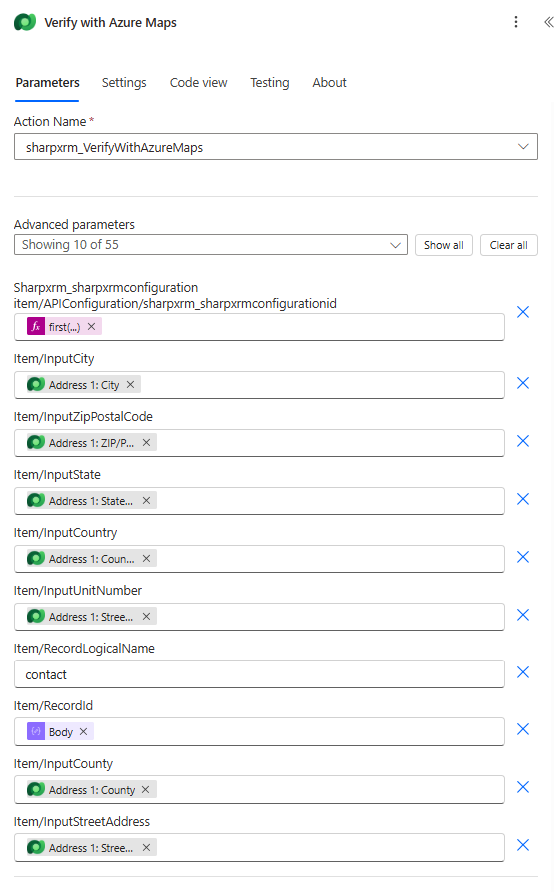
Why does the designer say "Showing 10 of 55"? The API Configuration input is a reference to a table row, so the designer lists every column of that table. Only the ID field needs a value.
Input fields
| Designer field | Required | What to enter | Value used in the example |
|---|---|---|---|
sharpxrm_sharpxrmconfigurationitem/APIConfiguration/sharpxrm_sharpxrmconfigurationid | Yes | The ID (GUID) of the API Configuration row that holds the Azure Maps key. | first(outputs('Get_AzureMaps_configuration')?['body/value'])?['sharpxrm_sharpxrmconfigurationid'] |
item/InputStreetAddress | Recommended | House number and street name. Without a resolvable street, the action returns ResultFound = Failed. | Address 1: Street 1 |
item/InputUnitNumber | Optional | Apartment, suite or unit. Azure Maps does not validate unit numbers, so this value is returned unchanged in UnitNumber. | Address 1: Street 2 |
item/InputCity | Recommended | City or locality. | Address 1: City |
item/InputState | Recommended | State or province. | Address 1: State/Province |
item/InputZipPostalCode | Optional | ZIP or postal code. | Address 1: ZIP/Postal Code |
item/InputCounty | Optional | County or region. | Address 1: County |
item/InputCountry | Recommended | Country name or ISO code. | Address 1: Country/Region |
item/RecordLogicalName | Optional | Logical name of the row being validated. Used only to stamp the transaction log. | contact |
item/RecordId | Optional | ID of the row being validated, for the transaction log only. | Contact ID output |
A transaction log is written only when Save Transaction Logs is enabled on the API Configuration row.
Output values
| Output | Description |
|---|---|
ResultFound | Success or Failed. |
VerificationDetails | For example OK|Validation Status : VERIFIED or OK|Validation Status : POSSIBLE_MATCH. On failure, it contains the reason. |
Confidence | Based on the Azure Maps match score: VERY_HIGH (score of 0.90 or more), HIGH (0.75 or more), MEDIUM (0.50 or more), otherwise LOW. |
StreetAddress | House number and street, for example 1600 Amphitheatre Parkway. If Azure Maps only matched the street, there is no house number. |
UnitNumber | The unit you supplied, returned unchanged. |
City, State, County, Country | For example Mountain View, CA, Santa Clara, United States. |
ZipPostalCode, ExtendedZipPostalCode | Postal code, plus the extended code (ZIP+4 in the US, or the full code such as M5H 1H1 in Canada). |
FullAddress, Latitude, Longitude | Formatted address and coordinates. |
EntityType | Usually empty for street addresses. |
Decide whether to update the row
Important: Azure Maps has no rooftop indicator, and it can give a street-only match a very high score. For example, Main Street, Toronto returns VERY_HIGH with several postal codes. The example therefore requires all three of these conditions before it overwrites:
body/ResultFoundis equal toSuccess.ConfidenceisVERY_HIGHorHIGH.- The validated street starts with a house number:
and(greater(length(trim(coalesce(outputs('Verify_with_Azure_Maps')?['body/StreetAddress'], ''))), 0), contains('0123456789', take(trim(coalesce(outputs('Verify_with_Azure_Maps')?['body/StreetAddress'], '')), 1)))is equal totrue.
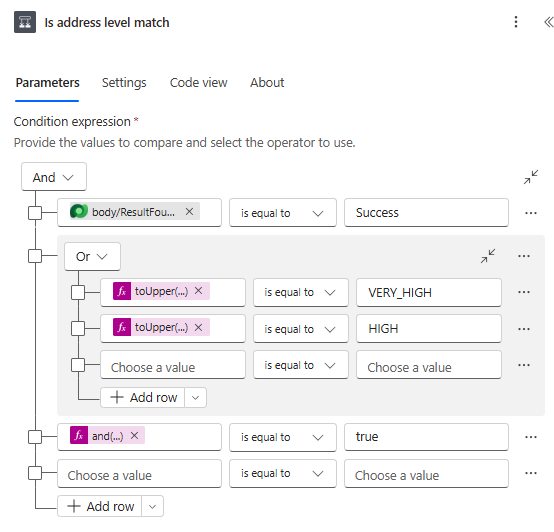
In the True branch, Update a row (Contacts) maps StreetAddress, UnitNumber, City, State, ZipPostalCode, County, Country, Latitude and Longitude to the Address 1 columns. Each column keeps its current value when the output is empty, using an expression such as if(empty(outputs('Verify_with_Azure_Maps')?['body/County']), outputs('Get_contact')?['body/address1_county'], outputs('Verify_with_Azure_Maps')?['body/County']). In the False branch, a Compose records the result, confidence, details and suggested address for the run history.
Expected results
- 1600 amphitheatre pkwy, mountain view, CA, USA:
VERY_HIGHwith a house number. Updated to 1600 Amphitheatre Parkway, Mountain View, CA 94043, Santa Clara, United States, with coordinates. - 100 king st w / suite 5700, toronto:
MEDIUM, so the contact is left unchanged. - Main Street, Toronto:
VERY_HIGHbut no house number, so the contact is left unchanged.
Tips and troubleshooting
- Adjust the rule to your data: to be stricter, accept only
VERY_HIGH. Keep the house-number check either way. - ResultFound is Failed: check
VerificationDetailsfor an invalid license, insufficient address data, or an Azure Maps key problem. - Unit numbers: Azure Maps does not confirm units. If unit accuracy matters, use Google Address Validation or Melissa.
- Cost: every run calls Azure Maps and counts towards your Azure usage.