Overview
Address Validation for Dataverse exposes PostGrid address verification as two Dataverse unbound actions. Power Automate can call them with the standard Microsoft Dataverse connector and its Perform an unbound action step:
| Action | PostGrid product | Use for |
|---|---|---|
sharpxrm_VerifyWithPostGrid (Verify With PostGrid) | US / Canada address verification | Addresses in the United States and Canada |
sharpxrm_VerifyWithPostGridInternational (Verify With PostGrid International) | International address verification | Addresses in every other country |
PostGrid sells these as two separate products, with their own endpoints, results and billing. They are therefore two actions, not one action with a country switch, so a flow never silently changes which product (and which billing) it uses. The example flow in this article routes each contact to the right action based on its country.
Both actions return a standardized address, a precise verification status, and a list of missing components. They do not update any record. Your flow decides whether the result is good enough to write back.
Before you start
- Address Validation for Dataverse is installed in a version that includes the PostGrid actions (
sharpxrm_VerifyWithPostGridappears in the Action Name list). - A valid Address Validation license that includes the PostGrid add-on. Without it, the actions return
ResultFound = Failedwith the message There is a problem with the product licence. Please contact the administrator. - A PostGrid account with address verification enabled.
- An active API Configuration row with Validation Service Type = PostGrid API that holds a secret key (
live_sk_…ortest_sk_…). The actions run on the server, so they need a secret key. A public key (live_pk_…) is rejected with an allowed-origins restriction error, because public keys only work from registered browser origins. If you also use the PostGrid autocomplete control, create two API Configuration rows: one with the public key for the control (for example PostGrid Autocomplete), and one with the secret key for verification (for example PostGrid Verify). - A Microsoft Dataverse connection in Power Automate.
Cost: PostGrid bills per lookup. Each verification uses one lookup, plus one more when IncludeGeocoding is Yes. Test keys (test_sk_…) use no lookups but return dummy data, so they are useful for building a flow but not for checking results.
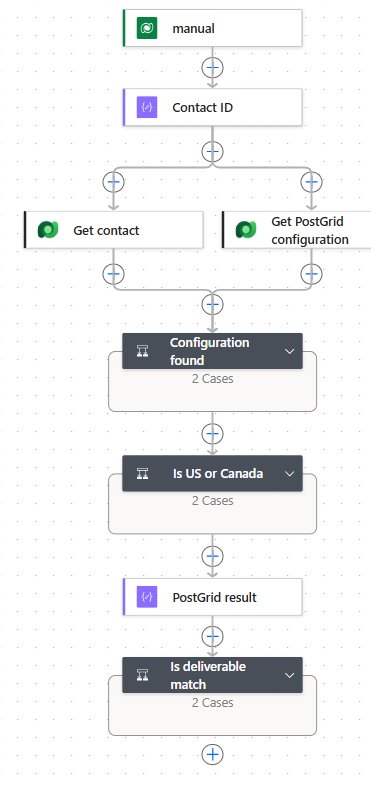
How the example flow works
- When a row is selected (Contacts): users run the flow from the Flow menu on a contact.
- Contact ID (Compose) and Get contact (Get a row by ID): read the Address 1 columns, including latitude and longitude.
- Get PostGrid configuration (List rows) and Configuration found (Condition with a Terminate in the False branch).
- Is US or Canada (Condition): sends US and Canadian addresses to
sharpxrm_VerifyWithPostGridand everything else tosharpxrm_VerifyWithPostGridInternational. - PostGrid result (Compose): merges the output of whichever action ran, so later steps have a single place to read from.
- Is deliverable match (Condition): overwrites Address 1 only when PostGrid confirms the address is deliverable.
Find the API Configuration
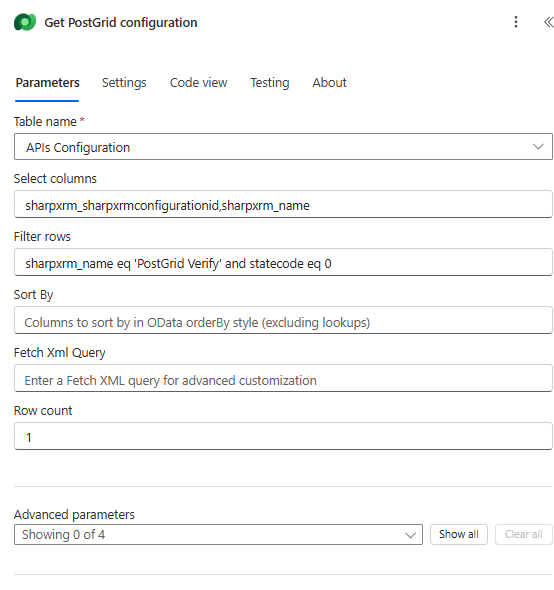
Use List rows on APIs Configuration to find the secret-key record by name:
| Field | Value |
|---|---|
| Table name | APIs Configuration |
| Select columns | sharpxrm_sharpxrmconfigurationid,sharpxrm_name |
| Filter rows | sharpxrm_name eq 'PostGrid Verify' and statecode eq 0. Use the API Config Name of your secret-key record. |
| Row count | 1 |
Route by country
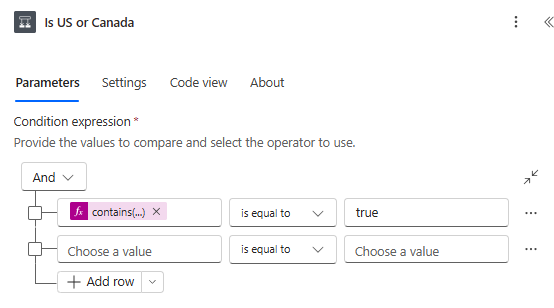
The Is US or Canada condition compares this expression with true:
contains(createArray('US', 'USA', 'UNITED STATES', 'UNITED STATES OF AMERICA', 'CA', 'CAN', 'CANADA'), toUpper(trim(coalesce(outputs('Get_contact')?['body/address1_country'], ''))))
Add any other spellings your data uses. Contacts with no country go to the international action, because it covers every country.
Call the unbound actions
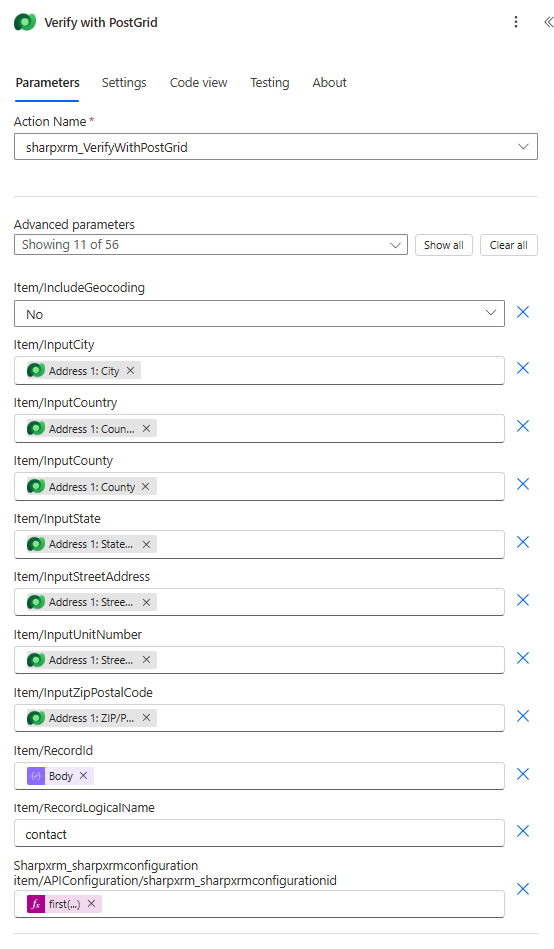
In each branch, add Microsoft Dataverse > Perform an unbound action. Choose sharpxrm_VerifyWithPostGrid in the True branch and sharpxrm_VerifyWithPostGridInternational in the False branch. Both actions take the same inputs. The designer shows "Showing 11 of 56" because the API Configuration input lists every column of that table. Only the ID field needs a value.
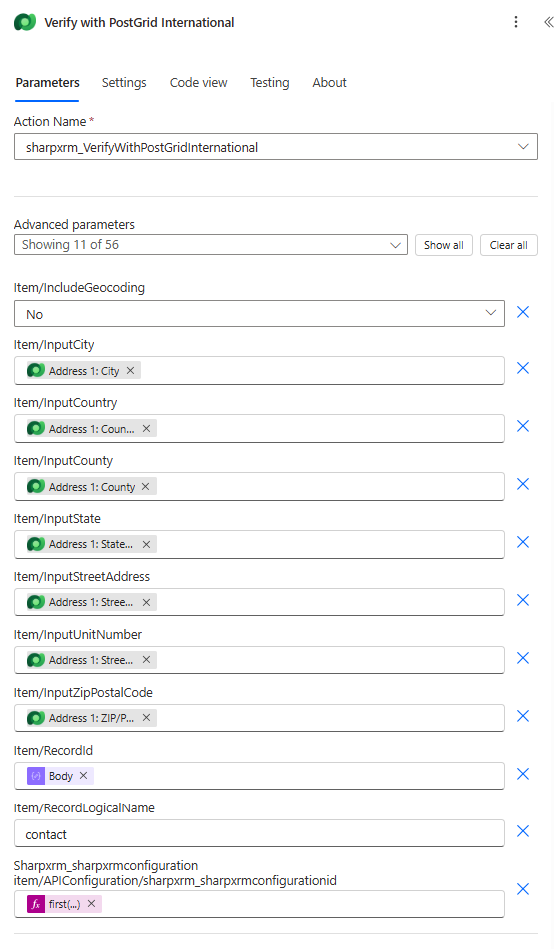
Input fields
| Designer field | Required | What to enter | Value used in the example |
|---|---|---|---|
Sharpxrm_sharpxrmconfigurationitem/APIConfiguration/sharpxrm_sharpxrmconfigurationid | Yes | The ID of the API Configuration row that holds the PostGrid secret key. | first(outputs('Get_PostGrid_configuration')?['body/value'])?['sharpxrm_sharpxrmconfigurationid'] |
item/InputStreetAddress | Yes | House number and street. | Address 1: Street 1 |
item/InputUnitNumber | Recommended | Apartment, suite or unit. Buildings with several units are only deliverable when the unit is supplied (see MissingSecondary below). | Address 1: Street 2 |
item/InputCity | Recommended | City. Supply at least the city and state, or the postal code. | Address 1: City |
item/InputState | Recommended | State, province or region. | Address 1: State/Province |
item/InputZipPostalCode | Optional | ZIP or postal code. | Address 1: ZIP/Postal Code |
item/InputCounty | Optional | County. | Address 1: County |
item/InputCountry | Yes | Country name or ISO code (for example US, CA, GB). | Address 1: Country/Region |
item/IncludeGeocoding | Optional | No by default. Yes returns latitude and longitude, but costs one extra PostGrid lookup per call. PostGrid must also enable geocoding on your account (contact PostGrid support). Until it does, PostGrid ignores the request, and VerificationDetails says that no coordinates were returned. | No |
item/RecordLogicalName | Optional | Logical name of the row being validated. Used only to stamp the transaction log. | contact |
item/RecordId | Optional | ID of the row being validated, for the transaction log only. | Contact ID output |
A transaction log is written only when Save Transaction Logs is enabled on the API Configuration row.
Output values
| Output | Description |
|---|---|
ResultFound | Success whenever PostGrid returned a usable standardized address, including addresses that are correct but not yet deliverable (for example, missing a suite number). Failed only when nothing usable came back. |
VerificationStatus | The exact verdict, for branching: Verified, Corrected, MissingSecondary, Unverified, Insufficient or Unknown (see the table below). |
MissingComponents | Exactly what is missing, for example Suite identifier, so a flow can ask the user for it. |
VerificationDetails | A readable explanation, including PostGrid's corrections. |
Confidence | VERY HIGH (with a space), HIGH, MEDIUM or LOW. |
StreetAddress, UnitNumber, City, State, ZipPostalCode, County | The standardized components. |
Country | The two-letter ISO country code (for example US, CA), not the country name. |
ExtendedZipPostalCode | ZIP+4 for US addresses (sharpxrm_VerifyWithPostGrid only). The international product already returns the full postal code in ZipPostalCode. |
FullAddress | The complete formatted address. |
Latitude, Longitude | Only when IncludeGeocoding is Yes and geocoding is enabled on your PostGrid account. Otherwise 0. |
EntityType | RESIDENTIAL or BUSINESS when PostGrid reports it. |
| VerificationStatus | ResultFound | Confidence | Meaning |
|---|---|---|---|
Verified | Success | VERY HIGH | Deliverable as supplied. |
Corrected | Success | HIGH | Deliverable after PostGrid corrected it. |
MissingSecondary | Success | HIGH | The address is correct but needs a unit or suite. Internationally, it was matched but not down to building level. |
Unverified | Failed | LOW | Could not be matched. |
Insufficient | Failed | LOW | Not enough input to identify an address. |
Merge the result
Only one of the two actions runs, so a Compose named PostGrid result picks the output of whichever one did:
coalesce(outputs('Verify_with_PostGrid')?['body'], outputs('Verify_with_PostGrid_International')?['body'])
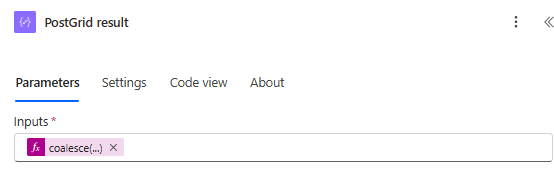
Later steps read fields from this compose, for example outputs('PostGrid_result')?['VerificationStatus'].
Decide whether to update the row
PostGrid has no rooftop indicator. The equivalent of a precise match is an address PostGrid confirms as deliverable. The example overwrites Address 1 only when:
ResultFoundis equal toSuccess, andVerificationStatusisVerifiedorCorrected.
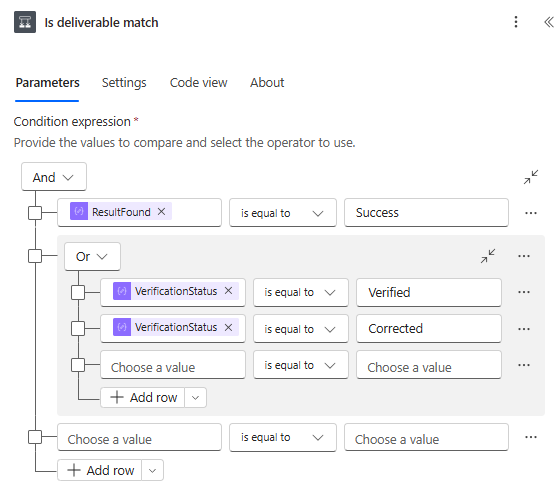
In the True branch, Update a row (Contacts) maps the standardized components to the Address 1 columns. Each column keeps its current value when the output is empty, for example if(empty(outputs('PostGrid_result')?['County']), outputs('Get_contact')?['body/address1_county'], outputs('PostGrid_result')?['County']). Latitude and longitude are only written when PostGrid returned coordinates. The country is written as the ISO code (for example US). If you prefer to keep the country name, leave the country column out of the update.
In the False branch, a Compose records VerificationStatus, MissingComponents and VerificationDetails. A MissingSecondary result is a good trigger to ask the user for the missing unit: the rest of the returned address is already correct.
Example
Verifying 780 Greenwich St, New York, NY without a unit returns ResultFound = Success, VerificationStatus = MissingSecondary and MissingComponents = Suite identifier, with the full standardized address intact. The example flow does not overwrite the contact, and the run history shows which component to ask for.
Troubleshooting
| Symptom | What to check |
|---|---|
| There is a problem with the product licence. Please contact the administrator. | The Address Validation license has expired or does not include the PostGrid add-on. |
| PostGrid rejected this API key because of its allowed-origins restriction… | The API Configuration holds a public key (live_pk_). Use a secret key (live_sk_). |
| HTTP 403 without an origin message | PostGrid quota exhausted. Check your remaining lookups in the PostGrid dashboard. |
| HTTP 429 | PostGrid's rate limit (5 requests per second for the whole organization) was hit. Retry, or reduce how many flows run at once. |
| A European or other non-North-American address returns nothing | It was sent to the US/Canada action. Check the country routing condition. |
| No coordinates | IncludeGeocoding is No, or geocoding is not enabled on your PostGrid account. |
Related articles
- Set up your PostGrid API Keys
- Understanding Address Confidence Levels
- Validate Addresses with Power Automate: Google Maps Geocoding (Unbound Action)